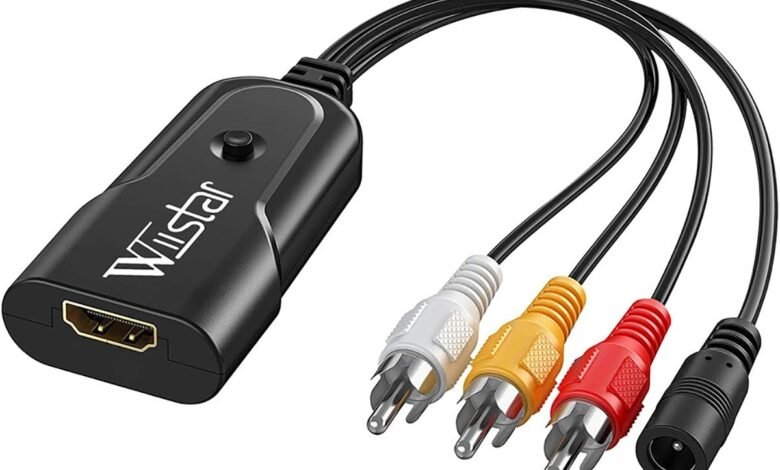
In today’s world of high-definition TVs and modern digital media, older devices like VCRs, DVD players, and classic gaming consoles often seem obsolete. However, with the right tools, it is entirely possible to enjoy your legacy devices on modern screens. RCA to HDMI conversion provides a practical solution, allowing you to connect analog devices to digital TVs seamlessly. Whether you’re looking to revisit nostalgic movies, digitize old recordings, or continue enjoying retro gaming, understanding this conversion process is key to preserving the quality of your media.
RCA cables, typically color-coded red, white, and yellow, carry analog signals, while HDMI transmits digital audio and video signals in high definition. The differences between these formats mean that you cannot simply plug an RCA cable into an HDMI port. A proper conversion device is required to bridge the gap. Beyond the technical necessity, learning how to set up and optimize RCA to HDMI connections ensures that you get clear video, synchronized audio, and minimal signal loss.
This guide provides a complete overview of RCA to HDMI connections, including understanding the technology, selecting the right converters, step-by-step setup instructions, troubleshooting common issues, and tips for maximizing video and audio quality. By the end of this article, you will be equipped with everything you need to connect your older devices to modern televisions efficiently, allowing you to enjoy your media without compromise.
Understanding RCA and HDMI Signals
RCA and HDMI serve fundamentally different purposes in transmitting audio and video. RCA, an older analog technology, carries signals in continuous electrical waves. This format has been a standard for decades, supporting stereo audio and composite video. RCA cables are straightforward but limited in resolution and susceptible to signal degradation over long distances. While reliable for older devices, the analog nature of RCA means it cannot natively interface with modern digital HDMI ports.
HDMI, on the other hand, is a digital interface capable of transmitting high-definition audio and video simultaneously. It supports advanced features like 4K resolution, multi-channel audio, and copy protection standards such as HDCP. The digital format ensures that signals remain consistent and sharp, even over longer cable runs. The challenge arises because analog RCA signals must be converted into digital form before HDMI can transmit them, requiring an active device known as a converter.
Understanding these differences is crucial. Without a converter, simply plugging an RCA cable into an HDMI port will result in no signal or a severely degraded image. Additionally, because analog signals can be more prone to noise and interference, proper conversion and high-quality cables are important to maintain the best audio and visual fidelity. Recognizing these limitations allows users to make informed decisions when selecting converters and setting up their devices.
Choosing the Right RCA to HDMI Converter
Selecting the right RCA to HDMI converter is key to achieving optimal performance. Converters range from simple, budget-friendly models to advanced devices with multiple features. Basic converters perform the essential function of translating analog RCA signals into digital HDMI, while more sophisticated models offer higher resolutions, audio optimization, and signal enhancement. When choosing a converter, it’s important to consider the devices you’ll be connecting and the desired video quality.
Key features to look for include support for full HD (1080p) resolution, compatibility with stereo or multi-channel audio, and HDMI version support for your TV. Some converters are powered, requiring an external USB or wall plug to operate, which often results in a more stable signal and better image quality. Passive adapters, which do not use external power, are generally cheaper but may produce inconsistent results, particularly for high-definition displays.
Additionally, reading reviews and understanding device limitations is essential. Not all converters handle every TV or source device equally well, so matching your specific equipment with a compatible converter ensures smooth operation. Investing in a reliable, well-reviewed converter will save time and frustration while delivering better picture and sound quality. Ultimately, the right converter balances performance, price, and compatibility for your specific setup.
Step-by-Step Guide to Connecting RCA to HDMI
Connecting RCA devices to HDMI-enabled TVs may seem intimidating at first, but the process is straightforward with the right equipment. First, gather your RCA cables, HDMI cable, and RCA to HDMI converter. Ensure that both your source device and TV are turned off to prevent any electrical issues during setup.
Step 1: Connect the RCA cables from your source device to the corresponding input ports on the converter. Typically, yellow carries video, while red and white carry right and left audio channels. Make sure the colors match correctly to prevent signal errors. Step 2: Use an HDMI cable to connect the converter output to the HDMI port on your TV. For optimal results, choose an HDMI port that supports the highest resolution your TV can display. Step 3: Turn on all devices and select the correct HDMI input on your TV. Most modern TVs allow you to cycle through inputs using the remote, ensuring that the converter’s signal is recognized.
Testing is an important final step. Play a sample video or audio clip and observe both the picture quality and audio synchronization. If issues arise, check connections, verify power to the converter if needed, and adjust TV settings for resolution and audio output. Following this step-by-step approach ensures that your RCA to HDMI setup works correctly and delivers a clear, high-quality media experience.
Troubleshooting RCA to HDMI Connections
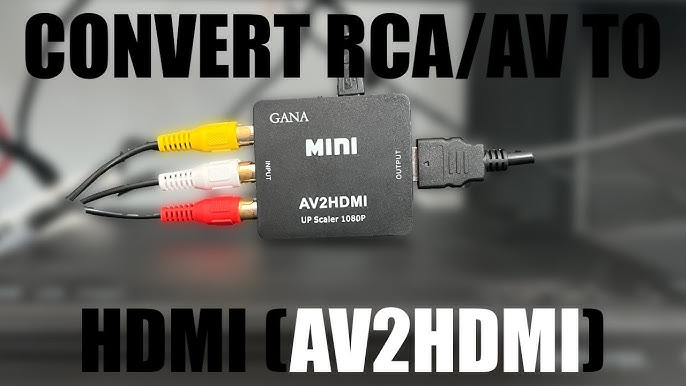
Despite following instructions carefully, users may encounter common issues when connecting RCA to HDMI. A typical problem is “no signal,” often caused by loose connections, incorrect input selection on the TV, or a malfunctioning converter. Ensuring all cables are securely connected and that the TV is set to the correct HDMI input usually resolves this issue.
Other issues include poor video quality, such as blurry or distorted images. This can result from using low-quality cables, incompatible converter devices, or resolution mismatches between the source and display. Audio lag is another frequent concern, where sound does not sync with video. High-quality converters with built-in audio correction typically address this problem.
Maintenance and proper handling of converters and cables also affect long-term performance. Keeping cables untangled, avoiding kinks, and protecting the converter from dust and heat can prevent signal degradation. By systematically addressing each issue and understanding the limitations of your devices, users can achieve reliable, high-quality connections.
Tips for Best Video and Audio Quality
For optimal results, invest in high-quality RCA cables and a reliable converter. Ensure your TV’s resolution settings match the output capability of the converter, and enable any available picture-enhancing features. Positioning cables away from electrical interference sources can reduce signal noise.
When possible, use powered converters rather than passive adapters to improve signal stability. Adjust audio settings on both the TV and source device to avoid lag and ensure proper balance. Finally, regular testing and occasional replacement of older cables will help maintain consistent performance. These small steps make a noticeable difference in achieving sharp visuals and synchronized sound.
Conclusion
Connecting older devices to modern televisions is no longer a challenge, thanks to RCA to HDMI converters. Understanding the differences between analog RCA and digital HDMI signals, selecting the right converter, and following proper setup procedures ensures a seamless experience.
By carefully choosing equipment, following step-by-step instructions, and addressing common issues, you can enjoy DVDs, VCR recordings, and retro gaming on modern HDTVs. With attention to detail and a little preparation, RCA to HDMI conversion allows legacy devices to thrive in the digital age, preserving cherished media and enhancing your home entertainment setup.
Frequently Asked Questions (FAQs)
What is the difference between RCA and HDMI?
RCA transmits analog signals, while HDMI carries digital audio and video in high definition.
Can I connect RCA to HDMI without a converter?
No, a converter is required to translate the analog RCA signal into digital HDMI format.
Will RCA to HDMI converters work with all TVs?
Most modern TVs support HDMI input, but compatibility should be verified based on the converter specifications.
How do I fix audio lag when using an RCA to HDMI converter?
Use a powered converter with audio correction features and ensure proper TV and source device settings.
Can I use the same converter for multiple devices?
Yes, but only one device can typically be connected at a time unless the converter has multiple inputs.
What is the best RCA to HDMI converter for gaming consoles?
Look for converters with low latency and high-resolution support to minimize lag during gameplay.
Will the picture quality improve when using an RCA to HDMI converter?
The converter allows for digital output, but the original RCA source resolution limits the overall quality.
Are RCA to HDMI adapters compatible with 4K TVs?
Yes, but the output will match the source resolution, which is typically lower than 4K.
How do I know if my RCA cables are still good for conversion?
Check for physical damage, fraying, or loose connectors, and replace cables if image or sound quality is poor.
Can I connect RCA to HDMI for streaming devices or only legacy devices?
RCA to HDMI converters are designed for legacy devices; modern streaming devices usually use HDMI natively.
You May Also Read: LVS Ascot Vacancies